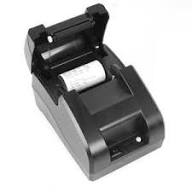
The POS-5890 (also known as POS-5890U) is a very popular economical mini thermal printer for small businesses. It uses heat to print receipts and tickets \(58\,\text{mm}\) wide. It works without ink cartridges and connects to computers via a USB cable.
Below are the basics to get it up and running:
1. Connection and Supplies
Paper: Uses thermal paper rolls \(58\,\text{mm}\) wide (maximum approximate diameter of \(50\,\text{mm}\)).
Power: The printer is not wireless; it must be connected to power via its adapter.
PC: Connect it to your laptop or desktop PC using the USB cable.
2. Driver Installation
For your computer to recognize the printer, you need to install the corresponding driver:
Connect the printer via USB and turn it on.
Download the generic driver for 58mm POS printers from official platforms or your sales system provider.
Run the installer file and select the USB port to which you connected the device.
You can verify that everything is working correctly by printing a "Test Page" from the Devices and Printers menu in Windows.
3. Configuration for your Sales System
When printing from your system or browser:
Make sure to set the paper size to 58mm (or 58x48 mm) in the print options.
Set the margins to "None" to prevent the ticket from being cut or coming out blank.
If you have a cash drawer connected to the printer, remember to enable the Cash Drawer/Cash Selection option in the printer properties so that it opens automatically when collecting payment.